
An Outstanding Yet Mildly Confusing Portable Projector
Key Takeaways
- Excellent video quality with Dolby Audio for immersive audio.
- Impressive performance, but battery life is limited to 2.5 hours for video playback.
- Compact design with convenient features, but lacks USB-C port and has mounting thread issues.
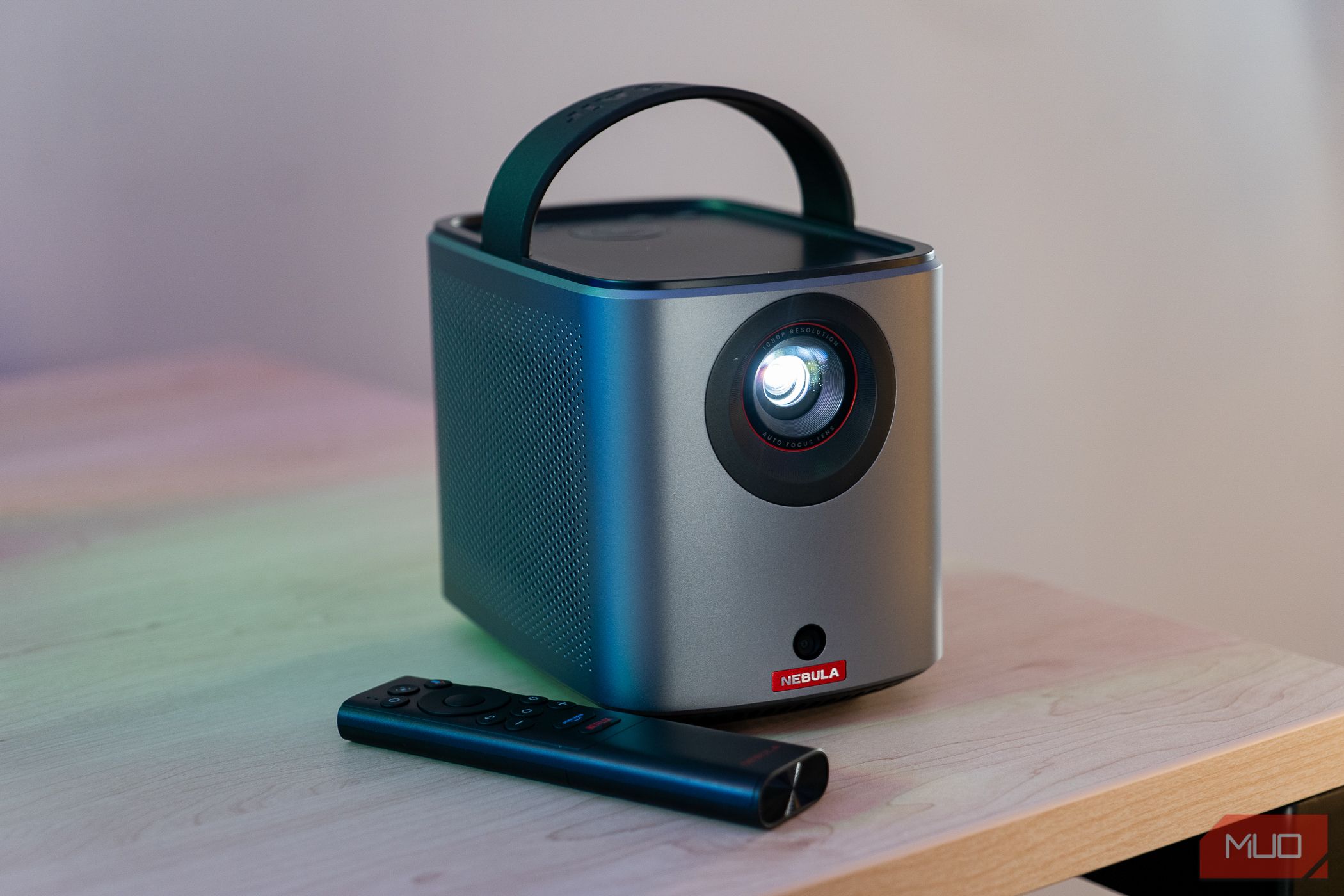
The Nebula Mars 3 Air is an impressive portable projector with outstanding picture quality, a decent battery life for its size, and numerous quality of life features. However, sacrifices made in the name of portability may make buyers think twice.

Nebula Mars 3 Air
The Nebula Mars 3 Air Projector is a superb device in video quality, ease of use, compatibility with streaming services and media, ands flexibility. Offering 1080p HDR video, Dolby Audio, a decent battery life, and convenient auto-framing for its display, this projector has numerous thoughtful design features, though its battery life is too short for longer viewing sessions, and it has some additional quirks that hold it back, such as a shallow mounting thread and no USB-C port.
- Superb quality for the size and price
- Incredible auto-framing and display adjustments for easy setup
- Broad compatibility with streaming services
- Convenient setup with Google TV
- Numerous port options for external connections
- Many additional quality of life features
- Portability limited by somewhat short battery life
- Shallow mounting thread makes it prone to wobbling
- USB-C would have been appreciated
- Somewhat laggy software
Pricing and Availability
Nebula came in swinging with the thoughtfulness of the Mars 3 Air’s features, all at a reasonably affordable retail price tag of $599.99, and often significantly lower when on sale.
Specifications
- Color
- Silver
- Wattage
- 90W
- Mounting Type
- .25″ thread
- Hardware Interface
- Button, Remote, and App controls
- Built-in Speaker
- 2*8W Dolby Audio
- Contrast
- 400:1
- Native Resolution
- 1920×1080, HDR
- Projection Technology
- DLP 0.23″DMD
- Throw Ratio
- 1.2:1
- Connectivity
- Bluetooth 5.1, Wi-Fi 2.4/tGHz
- Ports
- HDMI, USB-A, 3.5mm Aux
- Size
- 178 x 122 x 133mm
- Weight
- 1.7kg
- OS
- Google TV
- RAM
- 2GB DDR
- Battery Life
- 2.5 hours video, 8 hours music
The Mars 3 Air Has Phenomenal Video Quality
Even in imperfect conditions, such as with dim ambient light or on a textured wall, the projector’s video is clear and sharp. While it is limited to 400 ANSI lumens in terms of brightness, that is more than enough for this projector to present crisp, clear, and bright video even in imperfect darkness conditions. That said, it will not be sufficient for projection in a well-lit room.
Its resolution is limited to 1080p, but it can also display HDR video, which is an impressive feat considering its brightness level, which is quite high for a portable projector.

The Mars 3 Air has additional picture modes and advanced video settings to further dial into your desired video appearance, such as a Movie picture setting and advanced adjustments for DNR (Digital Noise Reduction). That said, the out-of-box video settings will likely more than suffice for most users.
Audio Quality Is Better Than Expected
This projector features impressive audio for the size, with dual 8W speakers stacked with Dolby Audio. In my testing, the audio was clear and rich in its depth, which is likely due to how frankly large the speakers on each side of the projector are.
The volume goes so high, in fact, that I did not exceed 30% volume for testing indoors for casual viewing.

Battery Life is Impressive for the Specs
The Mars 3 Air boasts 2.5 hours of battery life for video playback and 8 hours of audio. Considering the picture and audio quality, these are quite impressive battery specs. Additionally, the battery only takes 3 hours to charge from zero, and you can operate the device while charging it, though this may lengthen charge time.
That said, 2.5 hours is still a relatively short time when considering movie lengths. You won’t be able to binge entire TV seasons or watch more than one standard-length film on one charge.
Built-In Compatibility With Streaming Services Is a Plus
The Mars 3 Air boasts a huge amount of built-in compatibility with streaming services, largely thanks to its implementation of Google TV for operation. As such, you should be able to access just about any streaming service.
Additionally, the Mars 3 Air is advertised as licensed by Netflix, and while this may be more of a PR button than a feature, Netflix does work seamlessly on this device. It’s especially convenient to log in via your smartphone using a QR code instead of manually typing your login details.
In addition to direct access to streaming services, any device or service with Chromecast functionality can also stream content to the Mars 3 Air
Hardware Connections Are Helpful, Yet Not Ideal
In addition to all its digital streaming compatibility, the Mars 3 Air additionally has a few useful ports on its rear for more connectivity options:
- A full-size HDMI port for connectivity to gaming consoles, DVD players, and other devices
- A USB-A port for media files on flash drives
- A 3.5mm auxiliary port for external speakers or headphones

With streaming media dominating how we consume content, it is nice to see the option to utilize hardware connections too. That said, including USB-C—potentially via a combination port including display, data, and fast charging—would help future-proof this device.
Its Smartphone App Is Surprisingly Helpful
The Mars 3 Air comes with a dedicated remote that requires AAA batteries, but you can also perform all the remote’s functions using Nebula’s app using a phone connected via Bluetooth. This app has the added function of allowing you to type using a smartphone keyboard rather than remote navigation.
While the remote and its tactile buttons certainly are most pleasing to use, many users are likely to lose their remotes considering the portable nature of this projector. As such, allowing your phone to function as a remote is a great backup option in case you either lose your remote or would prefer not to lose it and keep it at home.
The projector itself has buttons for control without a remote, but adding redundancy for remote functionality is certainly nice to have.

Quarter Inch Mounting Is Convenient
At the bottom of the Mars 3 Air projector, there is a quarter inch mounting thread. This means the projector is theoretically compatible with just about any tripod and most standard mounting systems.
Unfortunately, this port is quite shallow, and the projector is highly prone to wobbling when mounted.
The Mars 3 Air Is Incredibly Easy to Set Up
First, the Mars 3 Air has numerous features to make the framing the display incredibly simple. Point it at a wall or screen, and press the Auto Focus button. Press enter, and the projector will use its myriad of features including Object Avoidance, Keystone Correction, Autofocus, and Screen Fit to perfectly position the screen on whatever you point it at.
We tested on a subpar spot—a bedroom wall with some clutter and cabinets—and even with imperfect positioning as well, it managed to fill out the largest, clearest section of the wall while avoiding obstacles. While this level of ease of use is increasingly standard in projectors, it remains incredibly convenient to have.
Setup Is Slower Without a Google TV Account
After the ease of display setup, we encountered a small hurdle on the software side.
This projector primarily uses Google TV to facilitate its access to streaming and YouTube, and users with a Google TV account can set it up more quickly via connecting to their smartphone app.
However, I tested the setup length without already having a Google TV account established, and it’s a longer process. Without an existing Google TV account, there are additional processes to click and wait through, one of which took around 8 minutes of waiting. Outside of this, other than brief load times, the setup process was smooth.
Considering setup is generally a one-time process for devices like a projector, the slowness of software setup is not a major drawback, and if you already have a Google TV account setup, you will likely have a faster experience.
Battery Life Is Hindered by the Small Size
This projector is indeed on the smaller side, which is a phenomenal perk for taking it with you. However, a portable size often comes with sacrifices in other areas.
The Mars 3 Air operates best when plugged in to a power outlet, but it is advertised to have 2.5 hours of battery life with 8 hours if only used for playing music. On the Nebula’s website, this is advertised as a key feature for its portable nature and utility on the go.
However, 2.5 hours is insufficient for many outdoor media viewing sessions. For example, if you bring this projector with you camping with the idea of watching a couple of movies during your stay, 2.5 hours is really only enough for one. The Mars 3 Air’s portability ends up reducing its battery size, which ultimately makes it less useful as a truly portable device.

Nebula’s full-size Mars 3 has twice the battery life despite being significantly larger (and more expensive). Ironically, a larger projector ends up having better portable functionality due to its larger battery life compared to the smaller option advertised as more portable.
All in all, a 2.5-hour battery life is far better than nothing and could certainly allow for a great outdoor media viewing session, but the device’s small size is more of a hindrance than a help.
Portability Makes it Suboptimal for a Home Theater
For a home theater setup, you simply don’t need any of the costs added or sacrifices required to make a projector portable. You don’t need a battery, and you don’t necessarily need the projector to be efficient with power.
The Mars 3 Air does indeed have incredible quality, a sharp image, and surprisingly good brightness considering its portable nature. However, you can likely find a 1080p projector for home media consumption at a lower price point with similar specs or the same price point with better specs, such as significantly higher lumens of brightness.
In other words, a projector for a home theater setup does not need to make any sacrifices when it comes to brightness or picture, whereas a projector meant for both home and portable usage often does.
The Mars 3 Air Has Additional Small Flaws
While we praised this projector for including physical media ports, USB-C is increasingly the standard for all connectivity. Moreover, USB-C can facilitate DisplayPort video connectivity. Lacking USB-C will not impact the vast majority of users, but it’s a small missing feature that could hold this device back in the long-term.
An additional inconvenience is the shallowness of the quarter inch mounting thread. We tested this device on a standard tripod for photography, and even when twisting the tripod’s mount all the way in, the projector remained highly prone to wobbling. This shallowness may be a result of sacrifices made for portability, but it makes mounting the projector quite precarious—don’t place it in a spot where people might bump into it.
Last, the software for this device isn’t exactly slow, but it isn’t snappy either. When switching apps or inputting commands, there is a bit of lag in processing these actions. This was especially apparent during setup.
The Best Use Cases for the Mars 3 Air
Considering this projector’s limited battery life, unless you have wall power at your campsite, we cannot wholeheartedly recommend it for campers in most cases and would instead recommend the full-size Mars 3 or another projector with a longer battery life instead.
However, even with limited battery life, it shines in many scenarios. In the same way, many laptops are portable but require wall power for full processing capabilities, scenarios that call for portability but also have likely access to power outlets seem ideal for this device, even if that access is only intermittent.

For example, this projector could be a great addition to parties by allowing a host or guest to set up an additional non-intrusive screen for gaming or watching media.
Similarly, the portable size certainly takes up less space than a TV. For home usage, we’d generally recommend a non-portable projector so as not to sacrifice quality, but if you have a limited space like a small studio apartment, a portable projector like this one could permit you to have a large screen without using the space a TV would require.
Last, we actually would recommend this for campers even without access to grid power if you additionally have a large portable battery with wall outlets, such as the Jackery Solar Generator 300 or 3000 Pro. This negates the small-ish battery issue while retaining all the perks of portability.
Should You Buy the Nebula Mars 3 Air?
The Nebula Mars 3 Air is an outstanding product, but its portable size ironically holds it back from being the portable projector it could have been. It’s not quite ideal for a fully-portable use case, nor is it right for most at-home use cases. That said, its superb quality, portable size, affordable price, and reasonable battery life still make it a flexible option that might be perfect for you.

Nebula Mars 3 Air
The Nebula Mars 3 Air Projector is a superb device in video quality, ease of use, compatibility with streaming services and media, ands flexibility. Offering 1080p HDR video, Dolby Audio, a decent battery life, and convenient auto-framing for its display, this projector has numerous thoughtful design features, though its battery life is too short for longer viewing sessions, and it has some additional quirks that hold it back, such as a shallow mounting thread and no USB-C port.